
How to Install WPDKI PRO?
Automatic Installation
Download the received Zip file. Go to your site’s plugins page.
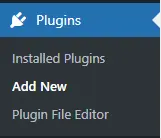
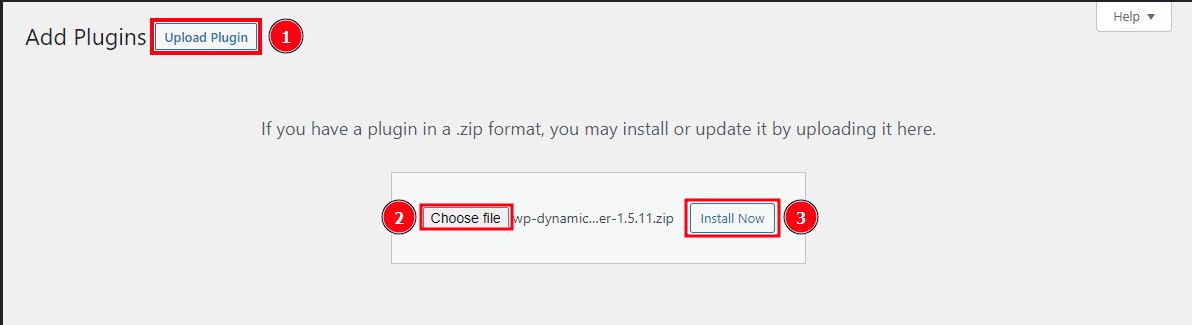
Head to Plugins > Add new > Upload Plugin.
Select the plugin’s Zip file.
Press “Install Now”.
Reduce Your CPC Cost, Increase Your Conversion Rates & Increase Landing Page Quality Score
After installation is complete please activate the plugin.
Manual Installation
After downloading the plugin Zip file, log in through FTP or Cpanel to your WordPress website.
Go to wp-content > plugins directory.
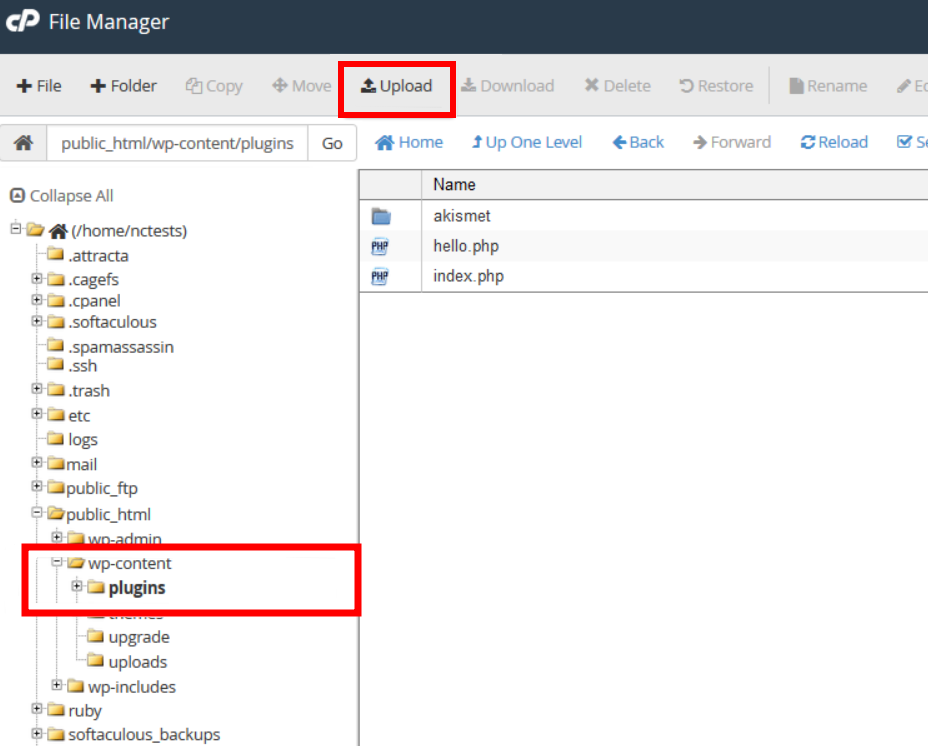
Upload the plugin’s zip file and extract it.
Now, log in to your website.
Go to plugins.
Activate the plugin “WP Dynamic Keywords Injector – PRO”


A common mistake made here is extracting and uploading the plugin with too many folders. The final directory structure should be /wp-content/plugins/wp-dynamic-keywords-injector-pro/…files in here. Some users will accidentally install it with an extra wp-dynamic-keywords-injector-pro folder like /wp-content/plugins/wp-dynamic-keywords-injector-pro/wp-dynamic-keywords-injector-pro/…files in here. The second one is incorrect and may cause the plugin to not work.